
Convert Pixel to Centimeter
Our calculator helps you prepare designs for print, ensuring your work looks as sharp on paper as it does on your screen.
Why PPI Matters?
PPI defines the relationship between digital pixels and physical units. Changing this value adjusts how large a pixel appears in the real world.
What is a pixel?
A pixel (short for “picture element”) is the smallest unit of a digital image or graphic that can be displayed on a digital device.
Think of pixels as the tiny “bricks” that build the image you see on your monitor or smartphone. While pixels define digital size, they do not have a fixed physical size until you define a resolution, usually measured in DPI (Dots Per Inch) or PPI (Pixels Per Inch).
What is DPI/PPI?
To convert pixels to centimetres, you must know the DPI (Dots Per Inch). This setting tells the computer how many pixels to pack into every inch of physical space.
72 DPI: The old standard for web images (lower quality for print).
96 DPI: The standard for most modern Windows screens.
300 DPI: The industry standard for high-quality professional printing.
How to use our pixel to centimeter calculator
Enter Pixel Value: Type in the width or height of your digital element.
Select DPI: Choose from common presets (72, 96, 300) or enter a custom value.
Get Results: The calculator instantly provides the equivalent size in centimetres.
How our calculator is different from others
Most converters give you a single result based on a “hidden” resolution. We believe in providing the full picture for your project. Unlike other calculators, ours gives a detailed multi-DPI breakdown which no other calculator provides. Instead of one number, we show you what your pixel value equals across the three most common standards:
Web Standard (72 DPI): See the size for basic digital displays.
Screen Standard (96 DPI): See the size for modern monitors.
Print Standard (300 DPI): See the exact size required for professional printing.
This allows you to verify if your image is large enough for a physical print without having to run multiple calculations.
Let our calculator do the heavy lifting
You are a genius in your own skill sets—whether you are an artist, a photographer, or a web developer. You shouldn’t have to pause your creative flow to wrestle with conversion ratios. Our calculator removes the “maths wall” between your screen and your printer.
The manual formula (if you want to check the maths)
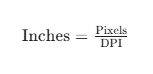
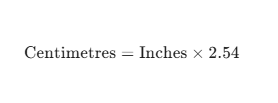
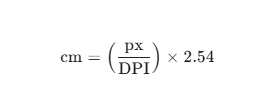
If you wish to calculate this manually, you first convert pixels to inches, then inches to centimetres:
- Pixels to Inches:
- Inches to Centimetres:
- The Combined Formula:
Common pixel to cm conversion table (at 300 DPI)
| Pixels (px) | Cm (at 300 DPI) | Cm (at 96 DPI) |
|---|---|---|
| 100 px | 0.85 cm | 2.65 cm |
| 500 px | 4.23 cm | 13.23 cm |
| 1000 px | 8.47 cm | 26.46 cm |
| 2000 px | 16.93 cm | 52.92 cm |
| 5000 px | 42.33 cm | 132.29 cm |
FAQs
What is the best DPI for printing?
For most professional printing, 300 DPI is the gold standard to ensure sharp lines and clear details.
Does changing pixels to cm change my file size?
No, the number of pixels remains the same. You are simply changing how those pixels are distributed across a physical surface.