
Commission Calculator
Calculate your earnings instantly and see the total payout after any sale. Our calculator helps you understand your income and plan your financial goals with absolute precision.
Commission Calculator
1. Base Figures
2. Commission Structure
Commission increases as you hit higher revenue milestones.
Performance Summary
Calculate your earnings based on sales performance.
What is a commission?
A commission is a form of variable pay given to an employee or agent for facilitating or completing a transaction. It is usually a percentage of the total sale price, though it can also be a flat fee. Commissions act as an incentive to reward high performance and are common in industries like real estate, recruitment, and retail sales.
Why calculating your commission is important
You are a genius in your own skill sets—whether you are a master of closing property deals, a recruitment expert, or a top-tier account executive. You shouldn’t have to pause your momentum to wrestle with complex payouts.
Income Predictability: Quickly see how much you will actually take home before the cheque arrives.
Goal Setting: If you have a monthly target, use this to see exactly how many sales you need to hit your “magic number.”
Fairness and Accuracy: Verify that your employer or partner is paying you the correct amount based on your agreed contract.
How to use our commission calculator
Enter Sale Price: Type in the total value of the deal you closed.
Select Commission Rate: Enter the percentage you earn (e.g., 3% or 10%).
Add a Flat Fee (Optional): If you receive a fixed bonus on top of the percentage, enter it here.
View Results: The calculator instantly displays your total earnings and the remaining amount for the business.
How our calculator is different from others
Most tools give you a single “total” and stop there. We believe in providing a clear breakdown so you can see exactly where the money goes.
Unlike other calculators, ours gives a detailed earnings breakdown which no other calculator provides. We show you more than just one number:
Gross Commission: The raw percentage of the sale.
Bonus/Flat Fee Inclusion: How your extra incentives affect the final take-home.
The “Company Share”: See the remaining balance of the sale after your commission is deducted.
This transparency allows you to see the full financial picture of the transaction, ensuring there are no surprises when pay day arrives.
Let the calculator do the heavy lifting
You excel at the art of the sale; let us handle the arithmetic. Our calculator removes the “maths wall” between you and your hard-earned rewards.
the manual formula (if you want to check the maths)
If you want to verify the logic behind the tool, here is the standard formula for a commission-based payout:
Find the percentage commission:
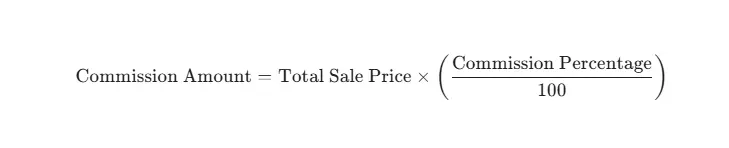
Add any flat fees:

Example: If you sell a property for £400,000 at a 1.5% commission rate: £400,000 × 0.015 = £6,000 commission.
FAQs
What is a "Draw" against commission?
A draw is an advance payment given to a salesperson, which is later deducted from their earned commissions. Our calculator helps you see if your total earnings cover your draw.
Does commission include VAT/GST?
Usually, commissions are calculated on the “net” sale price (the price before tax). Always check your contract to see if you earn on the gross or net amount.
Can I calculate tiered commissions?
Tiered commissions (where the rate increases after you hit a certain goal) are best calculated by breaking the sale into parts. Use our calculator for each tier to find your total.